
AI agent onboarding design
As the founding designer of a business startup, I turned the internal machine learning tool into an intuitive SaaS platform, focusing on agentic onboarding experience. Measure success by adoption, user activation, and user retention.
Salezilla is a lead-gen company that helps companies find hundreds of thousands of potential clients. It uses machine learning on the database instead of traditional filters, so results come back accurate and in larger volume.
When I joined, its clients were paying for a full service: Salezilla’s in-house specialists ran the tool and delivered results by hand. As demand grew, the company set out to turn it into a SaaS platform where startups get results by themselves.
Make an overwhelming tool feel welcoming
Before designing anything, I needed to see the problem the way a newcomer does.
The current internal tool is very technical.The first real result took about an hour of expert-level setup.
“There’s so much on this screen. I don’t even know where to start.”— External user, first session
“I skipped the instructions. I just wanted to click something and see what happens.”— External user
“Oh, this is overwhelming. I’d need someone sitting next to me to get through this.”— External user
A guided AI onboarding that talks in plain language
The agent greets you like a colleague, asks a few simple questions in plain language, and walks you through your first leads step by step. No manual, no setup maze.
Shipping it did one more thing: real users started flowing in, and with them quantitative tracking. For the first time we could see the drop-off stage by stage, and exactly where to aim next.
Session replay was blunt: only 17% of users made it through to a result. The goal or next stage is increasing the completion and activation.
Results from the start to earn user trust
The biggest leak was trust: a 34% drop in the first five minutes, before any result existed.
The flow let users spend 29 minutes until show any result, way past anyone’s patience.
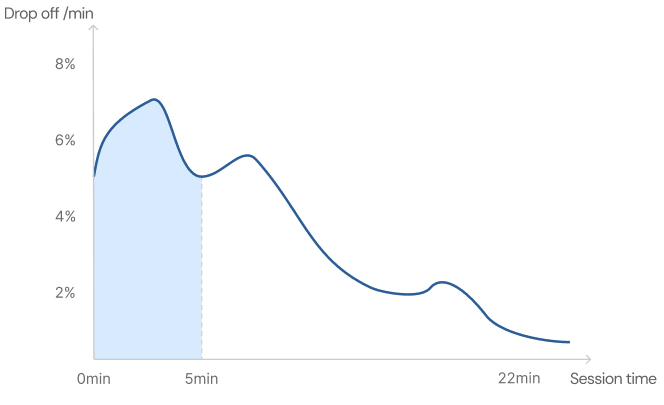
“I don’t trust your platform yet. I’ll look at the result, then decide if it was worth my time.”

The AI tackles the hard task, user just approve
Prompt improvement is the key to accurate results, but it’s the hardest task, and most newcomers never did it. So 53% of them spent a long time and never got a good result.
Automate hard tasks, with human decision in the loop
The agent automates the experts’ move: when companies don’t fit, it refines the prompt with that learning. But rewrite quality isn’t perfect, so the user keeps the final call.
The design challenge was picking that moment: finding the right frequency and context where a manual confirm is necessary and feels effortless.
🟢 Low disruption
🔴 High cognitive load
First-timers never think to visit a settings-like page to fix accuracy.
🟢 Minimum disruption
🟡 Medium cognitive load
The right moment, the right amount of friction
🔴 High disruption
🟢 Low cognitive load
It interrupted the labeling rhythm users had just settled into.
Every batch of five labels feeds the next rewrite, so the prompt gets sharper the longer you label.
Intuitive agentic experience across devices
As the founding designer I built the design system from scratch, across web and mobile. Focusing on copilot interaction that feels effortless and trustworthy.
A guided experience for the blank canvas dilemma
Users never face an empty screen. The agent opens with one clear ask: verify your company.
Every step arrives with its goal stated, and finished work slides away.
Intuitive inputs for all levels
For a difficult task like the prompt rewrite, there're 3 levels of effort, and every user finds the move that fits them.
- Regenerate: for a fresh version with no effort
- Open inputs: A non-tech user can quickly correct things in plain language
- Expert tweak: Clicks into the text and edits directly.
AI transparency
Sometimes the AI can’t complete the task, so the design prepares for a graceful failure and the best next act. The agent keeps its thinking out loud to gain user trust.
The flow continues with whatever users give.